Running Android Apps on Galaxy Tab
The best place for information is http://developer.android.com. However here are described some experiences noted while trying to run Android apps on a Samsumg Galaxy Tab, from Windows, then on an emulator.
The procedure is here
http://developer.android.com/training/basics/firstapp/index.htmlHere are the observations, which may be useful, though not intented to be complete. Use the official documentation and elsewhere for more.
Comments? Suggestions? Contact us
Installation Drives
It's best to put Eclipse, Android SDK and any Java on the same drive [eg. C:] crossing drives can be a problem.
Samsung Kies
There were still problems before installing this, and though it is not part of the developer.android.com procedure. You should be able to connect to the Tablet, and browse files. Which proves the connection to the Tab, independently of Eclipse and the SDK Platform.
Once downloaded, from Samsung website, and installed [installing hotfix took a long time, although Internet Forums indicate this can be a problem, waiting patiently was enough.] do reboot after the installation.
Note the file protocol is Media Transfer Protocol [MTP] which is browsable from explorer but alot of low level dos type commands won't work. [the Tab shows up under My computer > GT7510 and you can copy/paste from there.]
Eclipse
Here used Eclipse 4.2 and simply followed the developer.android.com instructions. Therefore after installing Eclipse
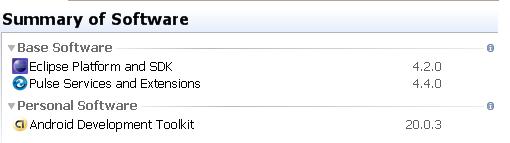
This gave a pending change, which was *Apply* and once done was listed in the Summary of Software.
Android
The following items are loaded with the Android SDK Manager either from within Eclipse or directly.
SDK Platform
These transfer locally with SDK Platform
c:\Program Files\Android\android-sdk\platforms
In a separate folder for each API version eg. Android-16
Read Android Documentation Offline
The developer.android.com site is transferred to your local computer as part of Documentation for Android SDK using the Android SDK Manager
It populates the following locations under the android folder.
C:\Program Files\Android\android-sdk\docs\offline.html
Once there the offline help can be accessed from on your PC, some links point back to the web, but it is simple enough to avoid those. Make sure scripts etc are enabled in your browser, so you can see all the features.
Samples for SDK
These transfer locally with Samples for Android SDK
C:\Program Files\Android\android-sdk\samples\
In a separate folder for each API version eg. Android-16
These can be imported to eclipse using: New > project > Android > Android Sample Project.
Sources for SDK
These transfer locally with Sources for Android SDK
C:\Program Files\Android\android-sdk\sources\
In a separate folder for each API version eg. Android-16
Google USB Driver
Transfer locally with Google USB Driver
C:\Program Files\Android\android-sdk\extras\google\usb_driver
Android Support Library
These transfer locally with Android Support Library
System Images
These transfer locally with ARM EBAI v7a System Image etc
C:\Program Files\Android\android-sdk\system-images
What to install?
All of these, if you pick and choose you'll probably need something later, but its not necessary to load every version.
Which versions will effect what can run on a device or emulator.
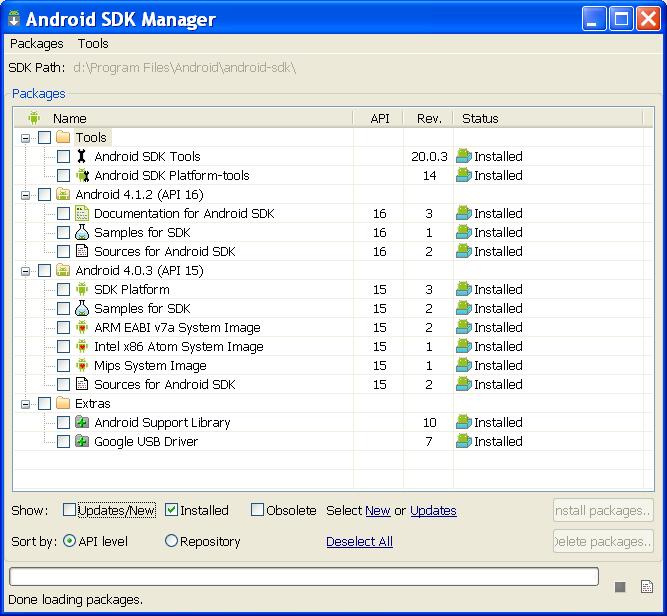
Here we were testing on Ice Cream Sandwich: Android 4.0.4 on the device. So selected were 4.0.3, the whole package including System Images. But also 4.0.12 documentation, samples and Sources, but only the SDK Platform for 4.0.3. [I think SDK Platform for 4.0.3 supports all versions upto 4.0.12, I assume because those versions up to the next SDK Platform release are backwardly compatible] . Here is how it looked when done.
Launching an APP
Following the "myFirstApp" example and instructions on android.developer.com and remembering to Plug in the android Tablet, wait for Windows to pick it up---then launch the App. Now several things can happen at this point, and if the App does not appear on the device it's a disappointment. There are a couple of logs to look at.
LogCat is a source of a fully comprehensive log, but I found it too much for simple problem solving, full details as usual at android.developer.com. I found it in Eclipse under:
Console I found more concise under: . Clearing this before launching the App can catch a bit of useful information.
I have collected a few examples see later.
Launching on a emulator or Device
Follow the standard instruction to build an emulator. These go to C:\Documents and Settings\J\.android\avd. But note that these are slow to started up, the emulator screen stays black for a long time. You will find the process emulator-arm.exe gets busy in Windows. [Hint: crtl-f12 to rotate orientation]. I found it much better to test on a real device, but note that there is no need to stop the emulator, you can launch the app again and again, on the same instance of the emulator. [Even so, a real device will save time!]
If an emulator is set up and a device exists, its best to control which runs, goto menu.
Use, so that when you run the App you will get the Android Device Chooser.
You will see either a running android or a new Android Virtual Device [AVD].
An AVD emulator needs to fully start up to show up in the list. Alternativity your real device should also show up in the list, again this can take some time after connection and even need to restart the device, to make it appear. The USB icon on the Galaxy Tab Android Desktop should be the first sign of the connection.
Java
Although it is not the focus of the current discussion, to build standalone Java applications for windows, the Java Development Kit [JDK] can be installed. To run a Java application on Windows requires a Java runtime environment like Java SE find out more at:
http://docs.oracle.com/javase/tutorial/getStarted/cupojava/win32.html
However that is not necessary for Android Apps, Eclipse can also compile Java and at runtime the App will run in the Davlik Virtual Machine in the Android Device.Command-line
The focus has been on running Apps from Eclipse, so not much was learned about running from a command-line.
I found the ant compiler at.
http://ant.apache.org/manual/install.html#advanced
Console Logs
This is the response when running on the device is is successful.
[2012-10-22 20:04:14 - My First App] ------------------------------
[2012-10-22 20:04:14 - My First App] Android Launch!
[2012-10-22 20:04:14 - My First App] adb is running normally.
[2012-10-22 20:04:14 - My First App] Performing com.example.my.first.app.MainActivity activity launch
[2012-10-22 20:04:14 - My First App] Automatic Target Mode: using device 'GYTRD4GF4JIKJNJ'
[2012-10-22 20:04:14 - My First App] Uploading My First App.apk onto device 'GYTRD4GF4JIKJNJ'
[2012-10-22 20:04:14 - My First App] Installing My First App.apk...
[2012-10-22 20:04:18 - My First App] Success!
[2012-10-22 20:04:18 - My First App] Starting activity com.example.my.first.app.MainActivity on device GYTRD4GF4JIKJNJ
[2012-10-22 20:04:19 - My First App] ActivityManager: Starting: Intent { act=android.intent.action.MAIN cat=[ xxx ] cmp=xxxx
Were getting this message before Kies Installed. [Could stop adb.exe process with Ask manger. Also tried to fix by Project > Clean... > Clean All Projects. But the launch still failed. Installed Kies may have helped this, by fixing the connection to the device.
[2012-10-21 21:45:07 - My First App] Please ensure that adb is correctly
located at 'C:\Program Files\Android\android-sdk\platform-tools\adb.exe' and
can be executed.
Can't launch a project if the AVD emulator API version is not in the range specified for the App
! Failed to find an AVD compatible with target 'Android 4.0.3'. ARM EABI v7a
System Image
Building an emulator
[2012-10-23 13:42:48 - SDK Manager] Created AVD 'test' based on Android 4.0.3, ARM (armeabi-v7a) processor,
[2012-10-23 13:42:48 - SDK Manager] with the following hardware config:
[2012-10-23 13:42:48 - SDK Manager] hw.lcd.density=240
[2012-10-23 13:42:48 - SDK Manager] vm.heapSize=48
[2012-10-23 13:42:48 - SDK Manager] hw.ramSize=512
Launching, defaulted to the emulator, took so long it generated some messages, and failed to run
[2012-10-23 13:49:41 - LinearLayout] ------------------------------
[2012-10-23 13:49:41 - LinearLayout] Android Launch!
[2012-10-23 13:49:41 - LinearLayout] adb is running normally.
[2012-10-23 13:49:41 - LinearLayout] Performing com.example.my.first.app.MainActivity activity launch
[2012-10-23 13:49:41 - LinearLayout] Automatic Target Mode: launching new emulator with compatible AVD 'test'
[2012-10-23 13:49:41 - LinearLayout] Launching a new emulator with Virtual Device 'test'
 ...
23 13:51:08 - Emulator] Failed to create Context 0x3005
[2012-10-23 13:51:08 - Emulator] emulator: WARNING: Could not initialize OpenglES emulation, using software renderer.
[2012-10-23 13:51:11 - Emulator] emulator: emulator window was out of view and was recentered
[2012-10-23 13:51:11 - Emulator]
[2012-10-23 13:51:12 - LinearLayout] New emulator found: emulator-5554
[2012-10-23 13:51:12 - LinearLayout] Waiting for HOME ('android.process.acore') to be launched...
Again a slow launch on an emulator, got bored and cancelled it, a few error messages but tried again and it did run eventually
[2012-10-23 14:56:12 - LinearLayout] ------------------------------
[2012-10-23 14:56:12 - LinearLayout] Android Launch!
[2012-10-23 14:56:12 - LinearLayout] adb is running normally.
[2012-10-23 14:56:12 - LinearLayout] Performing com.example.my.first.app.MainActivity activity launch
[2012-10-23 14:56:12 - LinearLayout] Automatic Target Mode: Unable to detect device compatibility. Please select a target device.
[2012-10-23 14:56:15 - LinearLayout] WARNING: Unknown device API version!
[2012-10-23 14:56:20 - LinearLayout] Uploading LinearLayout.apk onto device 'emulator-5556'
[2012-10-23 14:56:21 - LinearLayout] Installing LinearLayout.apk...
[2012-10-23 14:56:57 - LinearLayout] Failed to install LinearLayout.apk on device 'emulator-5556': null
[2012-10-23 14:56:57 - LinearLayout] com.android.ddmlib.InstallException
[2012-10-23 14:56:57 - LinearLayout] Launch canceled!
[2012-10-23 14:57:10 - LinearLayout] Success!
[2012-10-23 14:57:11 - LinearLayout] Starting activity com.example.my.first.app.MainActivity on device emulator-5556